Master
Hosts and approval queue
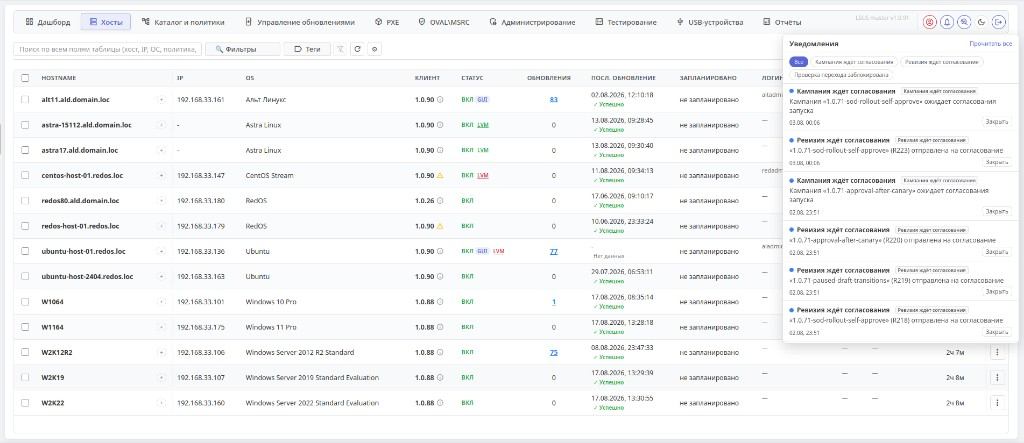
Linux and Windows fleet on one screen: status, updates, GUI/LVM tags. On the right—notifications: campaigns and revisions awaiting approval.
Manage software updates for Linux and Windows from one central console—at any scale, from data centers to fully air-gapped networks.
Overview
LSUS is an update-management platform for all your endpoints: workstations and servers running Astra Linux, Red OS, ALT, Debian, Ubuntu, AlmaLinux, CentOS Stream, Oracle Linux, and Windows—across data centers, branches, and fully air-gapped environments. Track compliance from one dashboard, approve campaigns and policy revisions, deploy updates in maintenance windows, and bring new machines into the estate over PXE.
Explore all featuresMonitor update compliance across every Linux and Windows machine, at headquarters and branches, from a single dashboard and host list. The notification center shows what needs a decision: campaigns and policy revisions, unreachable nodes, and sync failures. Deploy updates and review results without losing control.
Agents connect to the server over HTTPS—without SSH or open inbound ports. Start managing updates as soon as the agent is installed: configurations and playbooks are signed with the server key (Ed25519) to prevent tampering.
Manage patches with granular access rights: 8 RBAC roles plus LDAP/LDAPS and Kerberos SSO integration. Assign owners for critical deployments, keep a complete audit trail, and export events to your SIEM.
Install updates immediately, schedule campaigns for a specific time, or automate them during off-peak hours. Testing → stable channels, hold lists for critical packages, and schedules by host group ensure updates are deployed when it is safe for the business.
Every update first passes through a pilot group and checklists, then moves to stable for rollout across the fleet. Versioned group policies and wave deployments (precheck → apply → verify) minimize the risk of widespread outages.
A rollout campaign or group-policy revision does not reach production until an owner approves it in the console. Tasks arrive in the notification bell—with an “awaiting approval” filter—and can be mirrored to email or a webhook.
Deploy Astra Linux, Red OS, and ALT over the network: ISO media, custom images, an unknown-computer queue, and PXE points. Unattended install via kickstart, preseed, and ALT—without visiting every desk.
Features
One dashboard and a Linux/Windows host list: update compliance, reports, and a notification center—across headquarters, branches, and isolated environments.
Deployment campaigns and package jobs for Linux and Windows: KB catalog, approvals, and MSU—on demand or on a schedule.
Learn moreNew
A console bell for campaigns and policy revisions awaiting approval. Type filters, email, and webhooks keep changes out of production until someone decides.
New
ISO media, images, and install jobs for Astra Linux, Red OS, and ALT. Kickstart, preseed, and PXE points bring new machines into the estate without a desk-by-desk visit.
AD directory and collections: group endpoints by OS, domain, and criteria, then deploy updates to the right nodes at scale.
Maintenance windows, testing → stable channels, pilot groups, and checklists ensure updates reach production only after validation.
Declarative Ansible configurations: Ed25519-signed playbooks, a compliance map, and an ADMX/GPO-style policy builder.
Learn moreFleet health summaries, run analysis, and playbook drafts. Run locally with Ollama or in the cloud with GigaChat or Yandex AI Studio.
Learn moreMatch packages against CVE databases (OVAL: Debian, Red Hat, ALT, Ubuntu, SUSE, Oracle) and MSRC bulletins for Windows. Scan the fleet at scale.
Learn moreDirectory services, MaxPatrol, Directum RX, and X-Threat—wired in without custom glue.
ViewIntegrations
LDAP/LDAPS and Kerberos: SSO and roles from your corporate directory.
Export events and update status into the MaxPatrol stack.
Update test reports sent for approval in Directum RX.
Factor threat intel into patch planning and priorities.
Architecture
Clients communicate only with Master and Site. Edge connects only to Master: it is the perimeter for downloading and preparing updates, with no direct contact with workstation or server fleets.
When Site is unavailable, clients fail over to Master.
A single control point for policies, repository catalog, campaigns, PXE, OVAL/MSRC, RBAC, reports, and API. Connects to Site, Edge, and clients.
A branch proxy with local cache and smart replication from Master. Site clients connect to Site, and to Master when needed.
A DMZ edge server that works only with Master. It retrieves and prepares updates at the perimeter—without direct client access to Edge.
If Site is unavailable, clients fail over to Master. Once the connection is restored, the update backlog catches up during an approved maintenance window.
In an air-gapped scenario, packages are imported through ISO images and local repositories. If needed, Edge remains an external endpoint for Master only, never for clients.
Security
OVAL data sources for vulnerability analysis: Debian, Red Hat, ALT, Ubuntu, SUSE, Oracle.
Learn moreLSUS software is registered with Rospatent—certificate No. 2026615730, issued 27 February 2026.
8 roles—from viewer to admin—with LDAP/LDAPS and Kerberos SSO integration.
HTTPS at every layer (TLS 1.2/1.3), with no binary protocols or inbound ports.
A complete record of every administrator action, exportable to SIEM.
Syslog RFC 5424 (UDP/TCP/TLS) and HTTP webhooks for MaxPatrol, KUMA, and Splunk.
Playbooks and configurations are signed with the server key (Ed25519).
Pricing
Pricing combines the platform (Master, Site, Edge) with licenses for managed nodes. Choose Professional or Enterprise, annual subscription or perpetual licensing. The Early Access program offers a 30% discount.
View LSUS pricingResources
Linux and Windows fleet on one screen: status, updates, GUI/LVM tags. On the right—notifications: campaigns and revisions awaiting approval.
Hosts, users, updates, and Linux repositories at a glance—plus load charts and the link to Site.
Learn moreAn AD-like tree of domains, users, and computers; OS collections, LSUS roles, and policies—similar to GPMC consoles.
Learn moreMass package install by group: host progress, maintenance window, and check schedule.
Learn moreAPT and DNF in one catalog: Astra, ALT, RED OS, Debian, Ubuntu, CentOS Stream—status, integrity, and size.
Learn moreMass KB install on Windows workstations and servers: host progress and the next maintenance window.
Learn moreNetwork install for RED OS, Astra Linux, and ALT: composition presets, published images, and domain binding.
Learn moreLinux and Windows host summary: severity, vulnerable packages, and available updates from OVAL and MSRC feeds.
Learn moreSyslog RFC 5424 and HTTP webhooks for MaxPatrol, KUMA, Splunk, and rsyslog.
Learn moreFleet health summaries and run analysis—locally with Ollama or in the cloud.
Learn moreDMZ download queue: OVAL, the Windows catalog, and distribution mirrors including Oracle Linux—without direct client access to Edge.
Edge interfaceEdge mirror catalog: Astra, RED OS, ALT, Debian, Ubuntu, CentOS Stream—status, integrity, and portal presets.
Branch cache: site hosts, replication from Master, and link utilization.
Site role in the architectureLSUS (Linux System Update Server) is an enterprise patch-management platform. It centralizes checking, testing, and installing updates across Linux and Windows fleets: instead of visiting servers and workstations manually, administrators define policies, repositories, and schedules from one web console.
Yes. It is a core use case: local repositories, package import from ISO images, and an offline Windows update catalog. Clients use Master and Site within the environment; when needed, an Edge server in the DMZ connects only to Master and never serves clients directly.
Astra Linux, Red OS, ALT, Debian, Ubuntu, Kubuntu, AlmaLinux, CentOS Stream, Oracle Linux, Windows 10/11, and Windows Server 2012 R2–2022. Linux uses APT, DNF/YUM, and APT-RPM; Oracle Linux includes yum.oracle.com presets (BaseOS, AppStream, CodeReady) and repo.lsus.ru lines. Windows uses an agent with the Windows Update API and offline KB catalog.
It is the process of applying updates to remediate vulnerabilities, fix defects, improve functionality, and maintain performance. LSUS automates the full cycle, from OVAL/MSRC vulnerability analysis to testing, approval, and scheduled rollout.
Master is the control center and endpoint clients connect to. Site provides caching and replication for branches: site clients connect to Site and, when necessary, Master. Edge is the DMZ perimeter, connected only to Master and never serving clients. If Site is unavailable, clients fail over to Master.
Yes. LSUS (Linux System Update Server) is registered as software with Rospatent, certificate No. 2026615730, issued 27 February 2026.
Group-policy revisions and rollout campaigns can be sent for approval. The owner sees them in the notification center (bell), filters “awaiting approval,” and decides. Copies can go to email or a webhook.
Yes. The PXE module uploads ISO images to points, builds install images, and runs jobs for Astra Linux, Red OS, and ALT. Kickstart, preseed, and ALT unattended install are supported; unknown computers land in the PXE queue.
Next steps
Choose what works for you: a live demo or a quote tailored to your fleet. Requests go to info@lsus.ru; we respond during business hours.
We will show the console, Linux/Windows workflows, and air-gapped scenarios in a demo environment.
Request a demoBuild an estimate in the calculator; your quote request will include the selected license parameters.
Open calculatorOr contact us directly: info@lsus.ru · +7 995 437-14-87